Advanced CSS Menu 5 Light - Free Dreamweaver Extension
Create a lightweight and accessible CSS drop down menu in a snap.
This free Dreamweaver extension has everything you need to create a modern CSS drop-down horizontal or vertical menu without writing a single line of code.
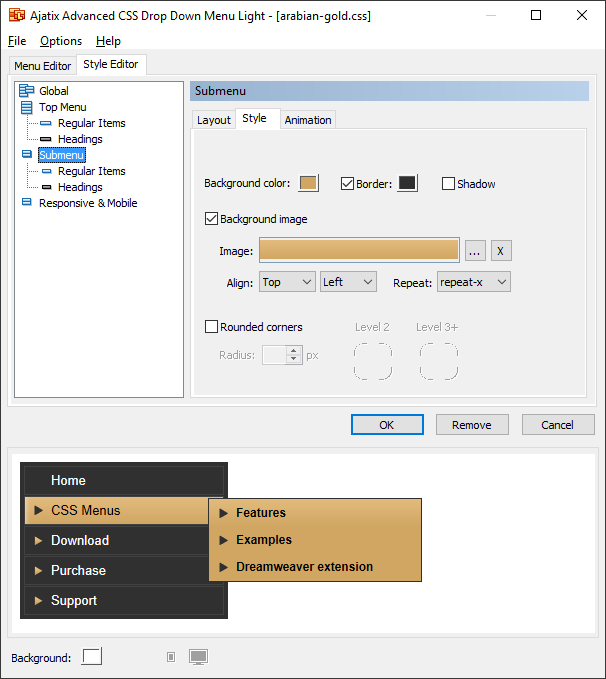
- All-in-one product - create horizontal, vertical, tabbed, text or image based menus with a single tool.
- Variety of styles - create your own styles or use preset themes, customizable in any aspect.
- Easy to set up - no JavaScript or CSS knowledge required, CSS generation is completely automated.
- Contemporary menu design - CSS styled unordered lists based markup.
- Full cross-browser compatibility - works in all currently used browsers (such as Chrome, Firefox, Edge, IE8 - IE11, Safari, Opera, etc.) and in most outdated browsers (including IE5.x - IE7), degrades gracefully in very old browsers.
- Support for touch devices - compatible with iPhone, iPad, Android, and other touch devices.
- SEO-friendly - all menu links, text and titles are placed directly on pages in plain HTML, absolutely accessible to search engines. Nothing is hidden in JavaScript files.
-

 Valid HTML and CSS - the menu markup complies with HTML, XHTML and CSS standards and passes W3C and Dreamweaver validity checks.
- Accessible - the CSS menu complies with W3C Web Content Accessibility Guidelines.
- Lightweight and fast to load - no heavy JavaScript support files are required, menus are ready to work as soon as they appear on a page and are fast to respond.
- Unlimited number of sublevels - deep menu structures are possible.
- Support for Sliding Doors technique - same image can be used for items having different width.
- Multiple menus on a page - you can have as many CSS menus on a page as you like.
- Dreamweaver templates supported - easily update your menu across the whole site by placing it into a Dreamweaver template.
- User-friendly Dreamweaver extension GUI - no need to dig into CSS files, make any change in menu style or structure with few comprehensive clicks.
- Live preview - see how your menu will look in a browser as you edit. Any change in the menu style or structure will be instantly reflected in IE browser embedded into this window.
- Preset themes - use one of the many preset themes as a building base for your menu design, or apply it to an existing menu at any time.
- Free - The Light version of Advanced CSS Drop Down Menu is absolutely free.
Advanced CSS Drop Down Menu Light examples
- Home
- Sporting Goods
-
Categories
- Cycling
- Fitness, Running & Yoga
-
Fitness, Running & Yoga
- Fitness Equipment & Gear
- Cardio Equipment
- Yoga & Pilates
-
- Indoor Games
-
Popular Brands
- Adidas
- Shimano
- Body Glove
-
- Clothes
-
Clothing
- Women's Clothes
- Men's Clothes
- Kids' Clothes
-
Accessories
- Jewellery
- Watches
- Bags
-
- About
- Contact


Advanced CSS Menu Light review/tutorial

Video courtesy of Webucator, Dreamweaver Online and Onsite Training Classes
Advanced CSS Menu vs Advanced CSS Menu Light
| Light Edition | Full Edition | |
|---|---|---|
| Headings | ✓ | ✓ |
| Rounded corners | ✓ | ✓ |
| Edge-aware dropdowns | ✓ | ✓ |
| Support for touch devices | Basic | ✓ |
| Responsive / narrow screens support | Basic | ✓ |
| Submenu open / close animations | ✓ | |
| Highlight current item ('You are here') | ✓ | |
| Smooth color transitions | ✓ | |
| Sliding Doors buttons | ✓ | |
| Individual styles for items | ✓ | |
| Stick to the top | ✓ |
System requirements
Microsoft Windows 10, 8, 7, Vista, XP, 2000
Mac OS X 10.15-10.5
Adobe Dreamweaver CC (2021-2014), CC, CS6-CS3, 8.0, MX 2004, MX